How to Add Pop-Up Google adsense Ads to your Blogger

How to Add Pop-Up Google adsense Ads to your Blogger

You can Add Pop-Up Google adsense ads to your Blogger. If Google Adsense Ads Pop up on your blog page then it will be more attractive. And visitor will click on your ads easily. It will Increase your Clicking on ads and Help to Increase Earnings. But Google Adsense does not support pop-up advertisement. so that i recommend to every blogger don’t put pop-up ads to on your blog


Add Pop-Up Google adsense Ads


1. Login in to your Blogger, then go to Blogger Dashboard .
2. Click on Layout .
Add Pop-Up Google adsense Ads


3. Click on Add a Gadget .
Add Pop-Up Google adsense Ads


4.  Now Choose HTML/JavaScript and Click on it.
 
Add Pop-Up Google adsense Ads


5.  Now Copy the Below pop up code , then Paste in HTML/JavaScript Content 
 
HTML/Java Script Pop-Up Code Here
 
<style>#btftopbar {height:2px;width:auto;background: #005094 url(‘..’);background-repeat:repeat-x;text-align:left;padding-top:2px;}#adsground {height:600;margin:0 auto;width: 350px;background:#fff;border-bottom:2px #005094 solid;border-right:2px #005094 solid;border-left:2px #005094 solid;text-align:center;padding:2px;}
#headlineatas {opacity:1.0;height:auto;width:auto;position:fixed;top:260px;left:460px;border-bottom:1px #005094 solid;border-bottom:0px blue solid;color:#333;padding:0px;z-index:1001;font-size:13px;}</style><script type=”text/javascript”>function getValue(){document.getElementById(“headlineatas”).style.display = ‘none’;}</script><div id=”headlineatas”><div id=”btftopbar”><span style=”color:#fff;font-size:10px;font-weight:bold;text-shadow:black 0.1em 0.1em 0.1em;float:right;padding-top:3px;padding-right:10px”><a href=”http://www.technet2u.com/” target=”_blank” onclick=”getValue()”>close ads</a></span></div><div id=”adsground”><p align=”left”><h3></h3></p><p> Your Google Adsense Code Here<br/></p></div></div>
 
6. Now Replace “Your Google Adsense code here” with your Adsense Code.
 
7. Now Click on Done.
 
 
please share this post
Mtn Introduces Weekend Bundle capped at 3Gb for N300

Mtn Introduces Weekend Bundle capped at 3Gb for N300


This info is online for some days now, but I want to do some research on it before I post it here.
Like we all know, MTN is giving out 3GB of data for just N300 recharge card to their customers on night weekends plan.
It was actually a nice plan cause you got to browse for all weekends.

The nice part of this is "if you can't use the MB finish till the end of that weekend, your account will be automatically charge the next weekend and the remaining MB from previous weekend will roll over with another 3GB of that present weekend", which makes it 3GB + previous weekend remaining MB.

How to subscribe:-

Load a N300 recharge card on your MTN Card and dial *123*3*1*5*2#.

There is actually a "Discount Coupon" people are using about this new plan.

It was said that if you don't have up to N300 on your SIM, if you try the code above, you will get a "Transaction Failed" error but you will also be credited with 3GB and N20 will be charge from your SIM.

Just Dial *123*3*4# to check Your Balance..

NOTE: it works best on MTN iPulse subscribers, so you might want to migrate to MTN iPulse if you are not there already.

Feel free to ask Question about this via comment below.

Enjoy..
how to bypass tweakware bandwidth limit

how to bypass tweakware bandwidth limit


This article features the best tips for using Tweakware for unlimited downloads without stress. It is divided into 3 parts which include how to fix proxy socket connection failed in Tweakware, how to bypass the daily bandwidth restriction of 100mb and get free browsing and unlimited downloads especially on Etisalat. Finally, we will show you how to get a stable uninterrupted internet connection for this tweak and stop it from disconnecting at intervals. For best performance, you will need to download the latest Tweakware version 0.7 from here.

firstly you need to know how to configure tweakware to work  click here to see how


How To Fix Proxy Socket Connection Failed In Tweakware - 


1. Download, install and Run your Tweakware v0.7 app, locate the Option button at the top right corner and tap on it to take you to settings.


2. Select “Settings” and first go down and tap on “Reset Setting” then go back up and ta on “Network Settings”.

tweakware-settings-ityunit


3. Check the box beside “Connect Via HTTP Proxy” to enable proxy and configure as follows:

·         Proxy Host: mobile.facebook.com
·         Proxy Port: 8080
·         Enable Proxy Tweaks
·         Click on Proxy Tweaks and Enable Reverse Proxy
Then go to Custom Headers and delete the default wap.ferry.com then add:
X-Online-Host: mobile.facebook.com
Take Note that there is one space between the “:” and “mobile” just like it was in the default “: wap.ferry.com”.
4. Finally, go back to Server Settings and Change Port to 3128


How To Bypass And Extend Your Daily Restricted Bandwidth 

And Get Unlimited Browsing And Downloads - 


1. Confirm that your device is correctly rooted
2. Click Here to Download (86kb) and install Android ID Changer
3. Run the Android ID changer and grant root permission
4. Backup your default ID either by Clicking on the download button sign or manually copy your real Android ID into somewhere else and save (so as to restore later in order not to void warranty).
5. Tap on the back button and click on the “+” sign above to generate a random ID for you.
6. Save New ID
Finally go back to your Tweakware and use any of the free servers (preferably the German Servers), you will be granted another free bandwidth for the day

How To Get A Stable And Better Internet Network Connection On Tweakware - ityunit.com

1. Go to Network Settings and go down to Connection Settings and check the box beside “Enable Keepalive”.
For the “Keepalive Interval”, type in “5” and for the “Keepalive Timeout”, choose “5”.
keepalive-tweakware-ityunit
2. Choose the country server instead of default server in the home page change it to “Netherland or Germany or Canada" and Click on CONNECT.
3. After successful handshake and authentication, press the back button and it will connect automatically.
Enjoy!!!
Applying these tips successfully will guarantee you a stable and better connection via Tweakware on Etisalat. So unless Etisalat network is very poor in your area, you would not be complaining of frequent disconnection issue again.
Please like our Facebook page, share this article on your social media by clicking any of the sharing buttons below and we do appreciate your comments.

pls Share this article
MTN FREE BROWSING CHEAT, DECEMBER CHEAT RELOADED

MTN FREE BROWSING CHEAT, DECEMBER CHEAT RELOADED


Free browsing tweak on MTN with music+ is here once again, get 150 MB data per subscription for free with MTN music plus data and reload it each time it finishes as many time as you want all day or get a SMS scheduler to send the sub code periodically. With this settings, you are guaranteed unlimited free downloads on mtn musicplus cheat. It is thatsimple on Psiphon and Simple Server settings.

 
mtn-musicplus-cheat-ityunit

How to Set Up Psiphon for Unlimited Browsing on MTN

1. With these settings, you can repeat the subscription as many times as you can but remember to opt out first when the mb finishes before subscribing again. Make sure you have zero naira
2. Subscribe and activate the MTN musicplus Bundle by text: MUSIC to 5900 then wait for the reply  or after some seconds Check your musicplus mb balance with the code: *559*2#
3. Click here to download and install the latest Psiphon handler 100


4. Open the installed Psiphon app and configure the handler as follows:
-          Proxy Type: Real Host
Under X-Online-Host,
-          Proxy Server: musicplus.mtnonline.com
Just leave the others


mtn-musicplus-ityunit


Tap on Save to close the Handler Settings. Then a pop up will appear and you have to choose “Tunnel whole device”
You will be taken to the main screen where you will go to the “Options” menu and select a region.
1. Select “Best Performance” in the ‘region select’.
2. Go down and locate “More options” under the “Handler” button.
3. Under the “Proxy Settings” Check the box beside “Connect through an HTTP” then select “Use the following settings”
-          Host Address: 10.199.212.2
-          Port: 8080
 
mtn-musicplus-settings-ityunit
 
4. Leave the others as default and go back to the main screen


To use Simple Android Server on Musicplus

1. Go to Local Server settings


2. Tick Use Global Proxy
3. Click General Settings
Proxy host: 10.199.212.2
Proxy port: 8080
Injection Query/Url: http:/musicplus.mtnonline.com
Injection host: musicplus.mtnonline.com
Injection line: press enter 4 times
4. Save and Start the SimpleServer

How to renew unlimitedly when the 150 mb finishes

1. Text Cancel7D to 5900 (to opt out of the plan first) then
2. Text D to 5900 and wait for the reply or after some seconds check your balance with *559*2#


 please dont leave without sharing this post................................
5 Benefits of Backlinks in
Addition to SEO

5 Benefits of Backlinks in Addition to SEO

High quality backlinks are a major piece of Google’s algorithm and they will continue to be, as they can be the deciding factor that pushes a website to the top of the search results. While link building efforts are done solely for search engine optimization purposes, they are beneficial for several other reasons.

Google is constantly rolling out new updates and data refreshes in order to penalize low quality websites that use spammy link building techniques to manipulate the search results. When building links a great rule of thumb is to ask yourself, “What would Google say if they were doing a manual review and they saw this link?”

Would they see it as non-spammy and something that actually provides value to the content?

Would they feel that it wasn’t overly optimized anchor text?

Not only does this help you stay out of potential penalty trouble, but it also helps to ensure your links will provide value to you in other ways in the event that Google wakes up one day and decides to not reward high quality links. Not many people think of the benefits of link building outside of the SEO benefits. Here are five additional benefits that high quality links can provide.


1. Build Your Brand Authority

Sure, getting links on popular websites is great for your SEO efforts, but they also help to build the authority of your brand. The same way Google looks as these links as a good indication that your website provides useful information, consumers see it as a good indication that your brand is one that they should take an interest in.

So, while high quality links on popular websites will greatly benefit your SEO, they will also help attract consumers to your brand simply by association. This also helps to present your company as an information source within your industry, and can even result in websites linking to your content, giving you natural backlinks, which Google loves.

2. Drive Steady Referral Traffic on Autopilot

Not all website traffic originates from a search on Google, Yahoo, Bing, or another search engine. Referral traffic is also a large percentage of all traffic, meaning that people are clicking on links within content and being taken to the linked content.

High quality links on sites with a lot of traffic will not only help your SEO, but they can also drive targeted traffic to your website around the clock. A single link on a popular website can continue to push traffic to your website for years. The beautiful thing about referral traffic is that it is highly targeted. Just think about how much money is spent on paid search. Some businesses have extremely high CPCs, so every referral click is driving high quality traffic without a cost per click associated with it. If you currently have a company handling your link building use these tips to evaluate your SEO company.

3. Long Term Directory & Resource Links

The internet is one big source of data that will continue to grow and always be there to access information from. If you obtain high quality links form reputable directories and other resource websites it can help to drive traffic to your website for years to come.

Imagine if your business sold “blue widgets” and you obtained a link on a directory of all blue widget manufacturers. For years, consumers searching online for blue widgets come in contact with your link and click through, landing on your website and converting into sales. Links like these can continue to attract visitors several years down the road.

4. Create New Relationships

When someone reads good content and sees a backlink pointing to the source or creator, there is a very good chance that they will click on the link to learn more about who or what is responsible for what they just enjoyed.

This can lead to that individual joining your newsletter or performing some other measurable action on your website. They might connect and follow your social media profiles or they might read your blog and then bookmark it or subscribe to your RSS feed. A simple link can bring a company and consumer together without the aid of search engine rankings.

5. Brand Name Exposure & Recognition

When someone is reading content online they can quickly identify the visible links within the content. When a consumer sees your brand name linked throughout great content they begin to associate your company with the particular topic(s) that they are seeing your brand name linked to.

The days of spammy anchor text links are long gone, and brand name anchor text is now a solid choice for safe link building. If you want to make sure that your SEO campaign is safe, make sure to check out these spammy SEO strategies to avoid.

When someone is reading content that you created and sees your brand name anchor text they will do one of two things. They will either click the link and visit your website, or they will register your brand name with the content they are reading. Even if they do not immediately visit your site they will now begin to associate your company with the content subject. This can lead to website visits and brand interaction down the road.

The main focus of a link building campaign will always be to improve the organ
Cheap Data Plans for Android, iPhone, iPad and PC in Nigeria

Cheap Data Plans for Android, iPhone, iPad and PC in Nigeria


MTN-Glo-Etsialat-Airtel-Nigeria


One of the rampant issues faced by most Android phone users and iOS users is the issue of cheap data plans for their smartphone, to get an affordable data bundle that will sustain you through internet browsing, chatting, downloads and the likes is a big deal if you are using Android phone, iPhone or iPad simply because of how much they deduct MB. Gone are those days of java phone where data plan is cheap and also a little megabyte will do you, reverse is the case when it comes to Android, iPhone and iPad.
Blackberry users enjoys cheap data plan on their blackberry phones but unfortunately enough, most of these data bundles does not work for android phone and iOS phones at least without tweaking, this is really frustrating and seems unfair to Android and iOS users. Some network provider offers cheap data plan for Whatsapp, BBM, Facebook, twitter and the likes for Android and iOS, but how manage will you be restricted to just one app, i guess this is not for every people, not for dynamic users.


In case you don’t know, the first blackberry phone running on Android OS is announced, Blackberry Priv
In this article am going to share with you the cheapest, most affordable and best data bundles you can use on your computer, android phones, tablets, iPad, iPhone and other smartphone.


Cheapest Data Plan for Android, iPhone, iPad or PC in Nigeria


These data bundles am about to share, they are the best affordable data plan in Nigeria right now and I have used it and still using most of them.

Cheapest Mtn Data Plan for Android, iPhone, iPad or PC in Nigeria


Mtn Night Plan 4.5GB for #2,500

Hey, don’t panic yet, is not only for midnight browsing, when you subscribe for mtn night plan, you would be given 3GB for night browsing and extra 1.5GB for daylight browsing totaling 4.5G for just #2500. Am using this mtn data plan on my android phone and believe me I have not for once regret using it. To activate mtn night data plan, load #2,500 then send 102 to 131. Or simply dial *123# and follow the commands in this order data services > My data plans > Night plan and select 4.5GBbnight @ 2500NGN
You can use mtn night plan for Android, iPhone, iPad and your PC. To use it on your laptop, subscribe for this plan on a phone and just turn on your phone hotspot and connect your PC to it.

Mtn 1GB for #1000

This plan works on all mobile phones and modem, in short any device using sim card, to opt in for this, visit any Mtn outlets or office and request for Mtn data, you can also get 2GB for #1800.
Mtn 2GB for #2,000
2GB at NGN2,000 data bundle plan. To activate, send “SPB” to “131″.

Cheapest Airtel Data Plan for PC, Android, iPhone or iPad in Nigeria


Airtel Blackberry Plan 2GB for #1500

This Airtel plan is another cheap data plan you can use, it works for Android, iPhone, and iPad, no tweaking. To subscribe to this plan load N1,500 and dial *440*16# or simply send Bbum to 440. To use this on your computer, follows the same step I mentioned in mtn night plan.

Cheapest Glo Data Plans for Android, iPhone, iPad or PC in Nigeria


Glo 3GB Blackberry Plan for #1000

This is one of cheapest unlimited data plan you can use. Don’t be surprise this works on Android phone CLICK HERE TO SEE HOW, it involves some little tricks, to use this glo bis plan,
Get a blackberry phone and insert your Glo SIM, load #1,000 and send comonth to 777, now wait for a message from Glo to confirm your subscription to the monthly blackberry plan, after that remove the battery and insert it again. You can now remove your SIM card from the blackberry device once the plan is activated. To use it for any non-blackberry device, go to phone network settings, create new access point names and set the apn to “blackberry.net”. Now you can start using it.
Another way to do this is to change your phone imei no to that of blackberry, you wouldn’t need a blackberry phone again, you just have to create new apn and that’s all.
Glo 1GB for #1,000.
It works for all device. To activate the 1GB at NGN1,000 data bundle plan, send “53” as a text message to “127”

Cheapest Etialat Data Plan for Android, iPhone, iPad or PC in Nigeria


Etislat 2GB for #2,000
This Cheap Etisalat data plan works on Android, iPhone, iPad, and PC. To activate, dial; *229*2*8#. To check your data balance, dial *228#


I believe you will surely find a cheap data plan that will suit you, don’t forget to share this with your friends on facebook, twitter and google+, you don’t know who might need it.


There is love in sharng, share now
Specifications of InfinixBig6 Infinix Note 2 with leaked photos of Infinix X600

Specifications of InfinixBig6 Infinix Note 2 with leaked photos of Infinix X600

We all can’t wait after reading the official announcement of Infinix Mobility about their new flagship device coming to stores near you on 29th of November 2015.
We can’t wait No More, so I finally got the leaked, think it has been released in some other countries in Africa. The phone is awesome
image
Screen Size :
6.0 inches

Operating System :
Android 5.1 XUI [Lollipop]

Battery :
4040mah Li-On Battery

Storage and Memory :
16GB Rom + 1.5GB Ram

Camera :
13mp back camera
2mp front camera

Chipset :
MTK OCTA CORE

And finally its going to be called Infinix X600 or the Infinix NOTE 2.

image

image

Infinix X600

image


What do you think about this Device? Will you get one? Let us know via the comments box.
How To Root Infinix Hot 2 X510 Without PC

How To Root Infinix Hot 2 X510 Without PC

Infinix Hot 2 Popularly referred to as “InfinixHottestOne”  this trending device has been in stores for a long time. Lots of people own this phone and still find it difficult to root it. 
image
Today I will guide you on “How To Root Infinix Hot 2 X510”.
DISCLAIMER : GISTPLUZ.COM can never be held responsible for anything that happens to your device. Try this at your own risk.

How To Root Infinix Hot 2 X510 

Be sure you download the Latest Version of Kingroot v4.5.2
Install Kingroot and Open the Application

image
Click on Start Root, let the rooting begin.
Be sure you’re connected to the Internet.

imageIf everything works well, you should be rooted within a twinkle of an eye.
It’s advisable you reboot after this process.
Let us know if it worked out for you via the comments box below.

Photo Credits : Wale Adekile : Geek.Ng


comment here if you have any other problem
how to root and change the Imei of Tecno Camon C8

how to root and change the Imei of Tecno Camon C8

The Tecno Camon C8 sounds more like a Camera name than a Smartphone. But a new smartphone from Tecno Mobile it is featuring a 13MP rear camera and 5MP Front Camera with flash. The manufacturer hypes the phone  as a Camera centric Smartphone.


Aside the Camera capabilities, Camon C8 which is a technically upgraded version of the Tecno Camon C5 features a 5.5 inch HD IPS display, 1.3GHz Quad processor, Android 5.0  Lollipop, 3000mAh battery, 1GB RAM, 16GB ROM expandable to 32GB via MicroSD card.


The Tecno Camon C8 is very stubborn device when it comes to rooting, because the popular and easiest apps such as Kingroot, Vroot, Framaroot, Tecnoroot, Rootgenius etc., are not working for it. The below tutorial will guide the Tecno Camon C8 users to Root and change the IMEI of their Smartphone.

Important Notice
After rooting your phone, it’s advisable to unroot before performing an OTA update or restoring factoring settings.

Materials Needed For Rooting
 
» PC with internet connection
» USB Cable
» SP Flash Tool - Download it Here
» SuperSU.zip - Download it Here
» TWRP for Tecno C8 by Team Hovatek - Download it Here
 

To Root Tecno Camon C8
 
 
» Save the SuperSU.zip that you downloaded to your phone's SD card
» Unzip the TWRP zip file that you downloaded and flash the recovery image to the phone using SP Flash Tool
» Now, boot your phone into TWRP Recovery Mode (by Holding the Vol Up and Power button simultaneously for 5 seconds)
» In TWRP Recovery, Choose install zip from SD card - to choose a zip from SD card use Vol up and down scroll up and down, then choose the Supersu.zip file from the root of your SD card.
Scroll to yes and install, after a successful flashing go back and reboot.

It is simple as that. You may download Root Checker from Play Store to verify your root privileges. After downloading, simply Install Root Checker, run it and you should get a success message after then.

All Credit goes to Team Hovatek for providing this guide in rooting Tecno Camon C8.


To Change Your Tecno Camon C8 IMEI to BB IMEI.
 
Note: It's not a must for you to root your Tecno Camon C8 before you can change it's IMEI, the below method of changing IMEI can work for your Tecno Camon C8 without rooting it, but rooting your phone will make you enjoy your phone the fullest.


1. First of all, you need 15 Digits Blackberry Generated IMEI. Simply download BBGEN. epic version here, to generate BB IMEI on your Android Device or Download GIPv4.1 Software to your PC here 
2. Also download and install MTK Engineering Mode from play store.  
3. Open it and click on MTK Settings
4. Then wipe your screen to left site to see Connectivity options.
5. Scroll down to CDS Information and tap on it.

Hot- How to browse Unlimitedly With N0.00 on your Mtn Line

Hot- How to browse Unlimitedly With N0.00 on your Mtn Line


Hello guys, how is your weekend going? Hope you are still Surfing the Etisalat Unlimited browsing …

Not while ago I posted how to use HTTP INJECTOR WITH ETISALAT CHATPACK Click here to read it…


With #0.00 on your mtn line u can now surf
the net using Slow DNS.


Just follow the simple steps and you are good to
GO...

DOWNLOAD

"VPN Over DNS"
HERE…

Make sure to Use your default phone APN.

After that open your SLOW DNS and set as follow:

• Dont touch the first and second box, move to third
box and select any free server of your choice

• on the forth box you will see something of this
nature DNS-1 IP delete it and input this
IP 10.109.5.97

• tick on "Keep changing source port" and alsobtick on "Binary Query" and connect.

After that wait for the proper authentication
and client configuration.

Once it connects you are good. Just continue surfing but don't download because you must have an upgrade to tunnel premium server.


Keep surfing the net for free. Drop comment for clarifications.
How To Get Google Adsense Approval in 2015

How To Get Google Adsense Approval in 2015

You will agree with me that Google Adsense is the highest paying advertising network and the most common way for bloggers to make money online, but getting your Adsense application approved is not easy. Many bloggers get fed up and stop applying for adsense after several disapprovals.

 
The truth is that I have experienced it so I know how bad it is after working hard on your blog to meet Adsense standards and at the end, you get the heart breaking message that you are not approved.
Well, worry no more about getting Google Adsense approval because today I will show you how to get your Adsense approved fast.


 And the best part is this: you will get approved within 48 hours if you follow the guides in this post.


  1.  read:MAKE MONEY ON THE INTERNET WITHOUT ADSENSE OR OWNING A BLOG. 


    Getting Google Adsense Approval Is Not Impossible

    Am sure you must have come across so many articles on getting Adsense approval and you have tried all the guides and yet your application is not approved. I just got my adsense application approved last week wednesday (24th June, 2015).
    So in this post i will be showing you everything I did to get it right. Just before you give up on Adsense and start searching for adsense alternatives kindly give this guide a try.


    My Adsense Adventure

    1. read:- Top 10 Alternative to Google Adsense and Other Ad Networks

    I did not do anything special in getting my Adsense application approved, all I did was follow adsense policies. So these are the things I did to get Google Adsense application approved.


    Focus On Quality Rather Than Quantity


    The biggest criteria to get Adsense approval is quality content. If you can write unique content then getting Adsense approval is easy. When I first applied for Adsense I had about 42 blog post on my blog but they were not all unique as some of them were copied from other blogs.
    After several of my applications got disapproved, I decided to give Adsense what it wanted (Quality Content). I moved all the copied content on my blog to draft and started writing unique contents from scratch.
    It was not easy but I was determined to get Adsense approval. I created a contact page, about us, and privacy policy page.
    After 2 weeks of intensive research and writing, I was able to publish seven (7) unique blog post. They were all free from any form of plagiarism and they were all over 800 words. Each blog post had at least two images, I created the images my self using Coreldraw and Photoshop. In fact, my blog posts were 100% unique from start to finish
    And that is it, I applied for Adsense and I got approved with a 4 months old blog and just 7 articles and 4 pages.


    The Truth About Google Adsense Approval


    So many people have written about getting adsense approval that you no longer know what to believe. During my search for tips on getting adsense approval, I read some blog post and some bloggers recommend having at least 20 blog post and domain age should be at least 6 months before applying but I got approved with just 7 unique blog post.
    It is a 15 weeks old blog having just 11 pages (7 post and 4 pages).
    So the truth is, to get adsense approval you need to focus on creating quality content and not quantity. Do not copy images from other websites or from Google images, try creating your own images or alternatively you can get free images from sites like pixaby.
    Also, domain age is not a factor in getting Adsense approval.
    I hope my experience with Google Adsense inspires you. I wish you good luck in your Adsense adventure.

    How to use Etisalat Chatpack, 2go Mb and Mtn Bis with HTTP INJECTOR

    How to use Etisalat Chatpack, 2go Mb and Mtn Bis with HTTP INJECTOR


    It not a new thing that Etisalat chatPack Have Stop Working on Psiphon..
    Read More Details Here…


    Today, I bring you another Coolest way to Rock
    your Etisalat Chat Pack and Mtn bblite
    package . For some of you having Issue in
    bypassing Social Me Speed Throttling, This App
    helps you Lifts the Speed Limit and enjoy Super Fast Downloading speed.


    HTTP INJECTOR is another
    wonderful alternative of Tweakware, OpenVpn
    Connect, Psiphon handler and Others.


    Http Injector Give you the benefit for using Free Premium server Unlike the Tweakware app that
    you have to pay before using premium server.

    Http Injector Can be Connected on His Own and
    Can Also be Connected Together With Other
    Vpn’s.


    HOW TO CONFIGURE YOUR HTTP INJECTOR

    DOWNLOAD HTTP INJECTOR HERE


    STEP 1: You Need To Create a free Account For
    your Http Injector Just Here to create
    and create the free account.


    Note: One account can be
    Used on One or Two devices only. Each Account
    Created Have Validity of 3days or 1week and You can Easily renew the account after its expires or Create Another Account.

    When You get to the Website, Now select EUROPE as continent
    Then Select any of the country in Europe
    continent either France, Netherlands or
    Germany.

    Now you can Register an Account with username and password
    and the simple math question Then click create account.


    STEP 2: Create New Mobile Access Points Settings

    For Etisalat Apn: etisalat

    Others: blank

    MTN Apn: web.gprs.mtnnigeria.net

    Proxy: blank

    Port: blank


    Download Http injector config for

    --------------------------------------------

    Download Chat pack config here

    -----------------------------------------


    Download 2go Mb config here


    STEP 4: Configuration for Http Injector Launch
    your http injector App Go to menu and import
    the config file from your SD card
    After Importing, Then Click on settings and set
    it
    as show below


    *connection mode: Select any iptables (root) is
    for rooted device and selected Vpn mode for
    Unrooted Devices


    *SSH HOST: Select your host due to your
    country
    e.g. de.serverip.co is for Germany, nl-
    public.serverip.co is for Netherlands e.t.c

    *SSH PORT: 443

    *Username- fastssh.com-your username

    *Password put your password.


    Go back and click start and wait for few
    seconds
    to show connected.
    [UPDATE ALERT] PSIPHONIS NO MORE WORKING ONETISALAT CHATPACK

    [UPDATE ALERT] PSIPHONIS NO MORE WORKING ONETISALAT CHATPACK


    I have received several mails from my users
    telling me that their etisalat chatpack with
    psiphon has stopped working and that is
    why I have decided to
    use this medium to reveal the latest sad
    news about psiphon with etisalat.


    Three months ago, some developers
    released a new app which was to be used to
    make etisalat chatpack also known as
    etimumu chatpack unlimited. The app was
    the one we popularly know as PSIPHON.
    This app worked for a long period of time but as at last two week ago, it stopped working on all phones which means that etisalat has
    finally discovered the trick we have been
    using against them and then decided to
    block it.

    Though, this tweak is still working but you
    will need to subscribe to either of their
    daily, weekly or monthly chatpack plan Click here to Get the Codes …

    Well, we are not giving up on this because sooner or later another means will be discovered on how to browse unlimited on etisalat. But for now we can still be using
    the MTN 2go/Samsung imei cheat.

    See how to Use Etisalat chatpack with HTTP Injector here

    also see how to use chat pack with Tweakware app here
    Kindly Drop a comment about this..
    ANDROID 6.0 MARSHMALLOW UPDATE COMING
FOR TECNO PHANTOM 5 AND BOOM J7

    ANDROID 6.0 MARSHMALLOW UPDATE COMING FOR TECNO PHANTOM 5 AND BOOM J7

    Phantom 5 The latest and most expensive also
    most impressive device from Tecno is yet to
    receive another red carpet recognition.
    This November Tecno will be releasing updates
    for their Beautifully made Tecno Phantom 5 and
    Boom J7 and this updates will be Android 6.0
    the latest From Google.


    Marshmallow has been installed on some
    Premium devices ranging from Nexus, hTc but
    Tecno seems to be the first to bring this updates
    to Africa Recognized devices. So if you’re a
    Phantom 5 or Boom J7 User I hope you’re
    getting ready to rock this new update.
    Latest Mtn Free browsing  for the month October and November

    Latest Mtn Free browsing for the month October and November

    MTN free browsing/Downloading is here again, so, no dulling guys. just make sure that your Psiphon, Openvpn and Simple Server are ready for work. This free browsing have limted time,Probably going to End on  January 31st, 2016.
    How To Activate The Free Browsing

    Grab your MTN sim card Then Send jumapp  to 131

    Now configured your Favorite Vpn’s

    For Psiphon Users

    Now set your MTN APN settings as
    APN: web.gprs.mtnnigeria.net
    Proxy: blank
    Port: blank

    Click HERE to Download the Psiphon handler for android device

    Open your Psiphon handler

    Under Proxy type select ‘‘real host”

    Under Proxy server: jumia.com.ng


    Then leave the others and save.

    Then click on Option => More option. Under “proxy settings”’ check the “connect through an HTTP Proxy” box.

    Mark Use the following settings

    Host Address: 10.199.212.2

    Port: 8080


    For SIMPLE ANDROID SERVER Users

    Now set your MTN APN settings as
    APN: web.gprs.mtnnigeria.net
    Proxy: 127.0.0.1
    Port: 8080
    Listen port = 8080
    Mark enable proxy box
    proxy host = 10.199.212.2
    proxy port = 8080
    Enable injection box
    Injection method = get
    Injection query/url = http://jumia.com.ng
    Injection host = jumia.com.ng
    Injection line = press enter 4 times
    buffer size = 8092
    log level = debug

    For PC Users


    Configure it as its seen below

    LHOSTIMETHOD =  ‘127.0.0.1’
    ISPLIT = 0
    RHTTP = 0
    TIMEOUT = 60
    PHOST = ‘10.199.212.2’
    RQUERY = ”
    RPATH = 0
    PTYPE = 0
    KEEP = ”
    BQUERY = ”
    MQUERY = ”
    RHTTPS = 1
    PPORT = 8080
    LPORT = 8080
    VALHDR0 = ‘jumia.com.ng’
    VALHDR1 = ”
    VALHDR2 = ”
    VALHDR3 = ”
    IQUERY = ‘jumia.com.ng’
    ADMODE = 0
    CQUERY = ”
    CUSHDR2 = ”
    CUSHDR3 = ”
    CUSHDR0 = ‘Host’
    CUSHDR1 = ”
    ILINE = 0
    FQUERY = ”
    SBUFF = 1024
    RPORT = 0

     THEN SET BROWSER AS
    Proxy: 127.0.0.1
    port: 8080

    Note: Don’t disconnect your Psiphon or SAS when downloading large file because it won’t connect again till next day. Immediate you disconnect, just no disturb your self ooo ,Jejele go keep the sim still next day or use another Sim to connect.
    Solution to Etisalat Social Me not working Again

    Solution to Etisalat Social Me not working Again


    Hello Guys, It been a While I Posted on My blog.&nbsp; It because i Have been busy all this while, Anyway I am still going to do my best to make sure you guys get the best from me.

    Early this Morning I received too many complaints from my readers&nbsp; about the Etisalat Social Me /chat pack not working again on their device. so I decided to go test it my self and indeed it has stopped working.

    Rumors has it that Etisalat has Blocked the social Me pack with is N100 for one day from Exceeding the normal one day, because it was formally Unlimited despite the fact that Etisalat Normally send us a message concerning the chatpack auto renewal stuff.


    " Dear Customer,Your protocol based Pack has expired and your renewal failed.Recharge and buy additional pack to continue enjoying the plan."


    so this is what you should know about the Current Etisalat free browsing tweak.


    • If you have earlier subscribed for the social Me one day play
    *200*3*3*2*1*1# > N100, Kindly note that it won't exceed one day, which gives week Chat pack an Advantage to it.

    } if you have subbed for the Weekly Chat Pack *343*5*6# (N150) it better,&nbsp; but Etisalat Monthly Social Me has an Advantage to it.


    Now for you to continue Enjoying the Etisalat Tweak you have to sub for the MONTHLY SOCIAL me which cost N500( *343 *6 *11#)


    Note: For Socialme package, you must be on Easy

    Cliq plan. If you are not on Easy Cliq before dail

    *244 *1# to migrate to Easy Cliq before you subscribe

    for Socialme package of N200.


    So that is all you Need.&nbsp; then you can continue Flexing&nbsp; it with


    PSIHON

    SIMPLE AND SERVER


    TWEAKWARE

    OPEN VPN


    JWP.

    then if you got any other questions use the comment box.


    NOTE- If you ask on whatsapp I will Snub you oo.. 👮


    enjoy and keep browsing for free...
    How to Share Your Android
VPN internet Connection to Any
Other Devices

    How to Share Your Android VPN internet Connection to Any Other Devices

    Many of us do use Psiphon handler, Openvpn Connect, Tweakware to rock MTN bblite plan and Etisalat social me unlimited plan and it is not New that most of us do have issue in sharing our connection to other devices because it’won’t work. But don’t worry, the solution is here.


    Today, am going to show you how easily
    you can share your Psiphon handler,
    Open VPN Connect
    and other Android
    VPN connection to any Devices that
    uses WiFi such as Blackberry , PC,
    Android Smart phones, iPhone e.t.c.


    The application we are going to make use of is called DF Tethering Fix.


    DF Tethering Fix allows you to remove
    limitation on tethering imposed by
    android and let you use your mobile
    Vpn networks such as Psiphon,
    OpenVpn, Tweakware etc.

    You can share the network using your mobile hotspot then other devices can connect to your Hotspot Using WiFi and browse happily.

    NOTE: Before you proceed , Make sure your devices is rooted


    How DF Tethering Fix Works.

    Click HERE to download DF Tethering
    Fix
    app on your android device.


    • First of all launch your Psiphon
    Handler or other related VPN and
    allow it to connect and make sure
    it’s connected on your Android smartphone.

    • Enable or Activate hotspot on your Android smartphone


    • Launch the Df Tethering fix and
    Click on FIX TETHERING until Tethering Fixed show up


    • Grant it Super user/Root Access on your phone

    • Enable WiFi connection on the
    other DEVICES you want to share
    with and connect it to your
    phone’s hotspot


    • That’s all, Then start Blazing on
    the Other Devices.


    NOTE: After you followed the steps above and the other device refuses to browse. Don’t worry, just Fix it with the steps below.


    [Sometimes, you may need to
    Disconnect your VPN so that the other
    devices can easily Obtain your IP
    address and successfully connect to
    your Hotspot, After the other devices
    have connected to your Hotspot then go
    connect your VPN back ]


    • After you connect the WiFi successfully then long press the connected WiFi and a pop up message will show then click on Modify Network.


    • Tick on Show Advance options and
    also press the DHCP


    • Now, Edit the DNS 1 to 8.8.8.8 and Save
    the new settings


    Then launch The Connected Phone's
    Browser and start Flexing!!


    IF YOU HAVE ANY QUESTION
    ABOUT THE POST, KINDLY USE THE
    COMMENT BOX


    SHARING IS SEXY=> SHARE THIS POST
    Download Updated Version of Psiphon Handler and enjoy Etisalat Smartpak with new settings

    Download Updated Version of Psiphon Handler and enjoy Etisalat Smartpak with new settings

    Am pretty sure that most of us are
    familiar with Psiphon handler.
    Either using it for Mtn bblite sub or using it
    for the Etisalat Unlimited browsing/
    downloading. But some of us are having
    issues with our current psiphon
    handler82 version
    . Some having issue
    with the app because it frequently
    disconnecting itself and some having
    issue with the delay of connecting to
    the server. If you are victim of any of
    the listed above issues, then the
    solution is here.


    I recently received the updated version
    of Psiphon handler from a friend and i
    decided to share you all the app. The
    Update version works greater and
    better than the previous version. In
    this post, am only going to take about,
    how you can use the Psiphon handler
    with the Etisalat Unlimited
    Downloading/Browsing. So that new
    freebies can Enjoy from the on-going
    unlimited Awoof.
    Let’s get started.


    Before you proceed: For those using
    Chat Pak Or any other Pak apart from
    social me. Will have to opt out from
    there previous plan. Because you can’t
    bypass speed throttling with the chat
    pak plan. don’t worry if you experience
    slow browsing or slow download while
    using this etisalat unlimited plan. Just
    Click HERE to learn how to bypass
    Etisalat speed throttling

    HOW TO OPT OUT
    *343*5*0#


    HOW TO USE THE ETISALAT
    UNLIMITED WITH PSIPHON HANDLER


    • load N100 etisalat credit in your
    sim card
    Dial *200*3*3*2*1*1# and make sure
    your N100 box is deducted
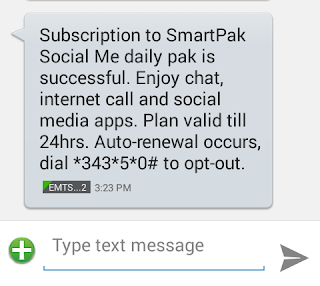
    Note: Don’t worry about the
    Confirmation message, Just make your
    sure that they deduct 100naira, Then
    keep rocking, it will not stopped after
    24hrs.


    see- Hot- Etisalat Unlimited Browsing for the
    month on September Via Open Vpn Connect
    (updated)
    …


    Now Create New APN settings On Your
    Phone As Follows:

    APN: etisalat
    Proxy:blank
    Port:blank

    Save And Activate it as your default
    settings

    kindly note that PSIPHON HANDLER does not work with ETISALAT CHAT PACK anymore
    Read complete details here

    Download The Updated Version of
    Psiphon100 handler      HERE……

    Psiphon Handler configuration

    Launch Psiphon handler and set it up
    as follows:

    Tick: Remove port
    Proxy Type: Select Real Host
    Proxy Server: mobile.facebook.com

    Then scroll down to the bottom and
    click Save...
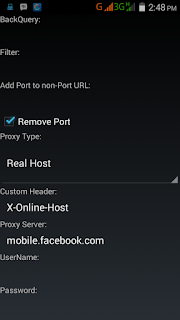

    AFTER SETTING YOUR HANDLER
    MENU.


    You will get a pop up message asking if
    you want to use psiphon browser only
    or Tunnel whole device.
    Make sure you
    choose tunnel whole device
    Then it will take you to the next screen,
    click on the option tab.
    Under region select USA
    server, Germany server or any one you
    wish, then click on more option.


    See - • Very Hot - Etisalat Browsing Unlimitedly And
    More Faster With Tweakware .


    Then click on more option.
    .Under
    “proxy settings”’ check the

    “connect
    through an HTTP Proxy”
    box.…

    Mark:
    Use the following settings and
    under

    Host Address: 103.10.22.242
    Port: 3128
    OR
    Host Address: 24.157.37.61
    Port: 8080
    use Any one.


    Now go back and click start to enjoy
    unlimited etisalat Browsing and
    Downloading.


    Below is The Solution to Psiphon Problems.

    Read - If you are Having problem With your tweakware Click Here

    PsiPhon Handler is Connected But
    Not Working with Operamini


    >> •Go to your opera mini settings
    >> •Go to Advanced under settings
    >> •Click on Protocol and Change Socket/
    Http to HTTP
    That’s All…


    Simple Android Server is Connected
    But Not Reading Upload and
    Download


    >> •Go to your app manager
    >> •Search for the Simple Server app
    >> •Clear the data app and reconfigure
    the SAS app

    or
    change your SAS proxy Host and Proxy
    port to another one.


    PsiPhon Handler Is Not Connecting

    Few things may cause your Psiphon
    Handler not to Connecting. If you
    haven’t downloaded Updated Psiphon handler then download with the Above Link.


    1. It May be that The server Region you are using may
    cause your Psiphon not to connect , Just
    try to change your server to another
    server or better choose Best
    performance.


    2. The Host Address you are using may
    have been Block. Just choose from the
    below Host address
    you can connect with this ones below

    52.76.6.81:3128
    40.76.88.70:3128
    91.121.202.110:3128
    120.236.148.113:3128
    69.12.74.127:3128
    176.31.170.136:8080
    213.42.212.209:8080
    194.83.240.11:8080
    58.215.64.140:3128
    92.48.127.95:3128
    69.12.74.127:3128
    202.21.181.110:3128
    82.192.30.253:8080
    60.29.248.142:8080
    210.101.131.232:8080
    213.168.68.10:8080
    94.231.116.134:8080
    89.208.212.2:80
    213.85.92.10:80
    103.27.111.246:80
    110.153.9.250:80
    120.85.132.234:80
    213.135.234.6:81
    113.140.25.4:81
    122.96.59.102:81
    122.96.59.104:81
    223.68.6.10:8000
    193.63.43.34:8000
    113.214.13.1:8000
    128.199.188.70:8000
    61.50.245.163:8000

    Read - • Useful Dangerous Apps you should Use on
    your Rooted Android Phone


    3. Network issue may cause psiphon not
    to connect, Just try to move Outdoor
    and location are where Etisalat network
    coverage is good...


    With this, You should able to Enjoy
    your Etisalat to the fullest .


    If you have any question or problem
    feel free to ask through the comment
    box.

    and don't forget to share this post.
    How to Bypass The Unlimited Etisalat Social Pack Throttling

    How to Bypass The Unlimited Etisalat Social Pack Throttling

    Click Here For the Genesis of this Etisalat Unlimted browsing

    Sorry for not posting it earlier, Have
    been busy handling other activities.

    I know that most of you are enjoying
    his or her own Social me Etisalat
    Unlimited Plan While some are yet to
    enjoy there’s fully. Notwithstanding,
    Am going to touch Some of the major
    problems that you may be facing while
    using SAS , TweakWare or Psiphon with Etisalat
    Unlimited Social Pak.

    The main issue many are facing is how
    they can bypass the Speed Throttle
    while Downloading or Browsing. So,Lets
    get started on how to Bypass the speed.

    NOTE: If your download speed is
    Higher than 60kb/s, That means you
    already bypass the speed Throttling,
    Just Move to Location where you can
    get Full network Coverage and High
    Download Speed.


    How to Bypass Etisalat Social Pack
    Speed Throttling


    It is Very Annoying when
    you see your downloading speed not
    Higher than 40kb/s while Other Psiphon Users are
    enjoying 1mb/s, 2mb/s, 6mb/s.
    If you
    are also victim of such don’t Worry
    anymore because the solution is Here.


    Firstly, You have to be on Social
    me Pack
    and not chat pack because you cannot bypass the speed throttling with the
    chat pack plan. ( Dial *200*3*3*2*1*1# and make sure
    your N100 box is deducted )

    Then try to Download Large file with
    your Uc Browser and Make sure that the
    Download can Pause and Resume. so,
    Observe the speed and if you notices
    that the speed is not Higher than 40kb/s
    or lower.
    That means You haven’t
    Bypass the Speed Throttling..

    Immediately switch off your data
    connection And Force close/stop your
    SAS, TweakWare or Psiphon then put On your data
    back and Launch your Psiphon/SAS/Tweakware.

    • Read- Tweakware shows Connected but not
    browsing, Here is how to Fix it
    •


    If you are PC users and connecting via
    Modem. Then Disconnect your modem
    and reconnect.

    NOTE: You may need to repeat the steps
    above like 2-4 =times before the Speed
    can be restored to Normal Etisalat
    speed.


    If you Are browsing or Downloading
    and Etisalat send you a message Like
    “you have attain your smart pack limit
    usage” or other related message
    like that.


    Immediately switch off your data
    connection put On your data back.


    Then Start Blazig it Hot and Download With Higher Speed..


    Lastly See -
    •How TweakWare is Rocking Faster than Psiphon


    Don't Forget to Share this wonderful post and Drop a Comment..
    Tweakware shows Connected but not browsing, Here is how to Fix it

    Tweakware shows Connected but not browsing, Here is how to Fix it

    Are you new to Etisalat Unlimited
    social pack? Kindly Click HERE


    Yesterday , i posted a post about
    using Tweakware to Rock Etisalat
    Unlimited Browsing And
    Downloading
    . Then i notice that lot
    of people are having some issues
    when trying to connect
    Tweakware.

    Especially for those
    running the app for the first time.
    Its show connected and always stay
    at Authentication successful but
    refuse to Browse. so i decide to
    show you the best solution to this
    issue.


    I have two Methods that will enable
    your Tweakware to show connected
    and browse when you click connect.
    So, Kindly follow the Steps by Steps
    procedure below.


    • Method 1


    When you are running Tweakware
    for the first time you need to update
    your tweakware server.
    All you have to do is to connect your chatpack via JwP or SaS so that the Tweakware would have an Internet Connection to Update.
    Now launch your Tweakware, then Press and
    hold the server list on the Home
    screen to update servers. And you
    can now select any server available
    on the list and Connect it and enjoy the Speed.


    •Method 2


    For this you need to
    manually configure the Tweakware
    by inputting the Proxy Host (IP) and
    Port under Tweakware Network
    Settings.

    Go to Settings>>


    Under Settings enter>> Network
    Settings >> Proxy Host and Port use any of
    the working Proxy server and for
    etisalat social pack.


    That’s all and you can now have a
    successful connection, Unlimited Downloads + Streaming .


    See • Simple Way to Bypass The Unlimited Etisalat
    Social Pack Throttling


    Comment below for Any other problem you are Facing .


    Share this post >>> Sharing is Sexy